Skip to content

M3U8 Downloader

Mac · Free download · Video Downloader for Mac

Download videos on Mac from one or more URLs.

Paste one or more links and choose a folder. The app analyzes video pages, HLS/M3U8 playlists, DASH streams, and direct files, shows the available resolutions, and can use an authorized browser session when needed. Videos download to your Mac with no cloud upload.

  • Multiple URL analysis
  • Video quality
  • Download queue

Version 2.1.1 (build 23), approximately 288 MB. Signed and notarized DMG. macOS 14 or later.

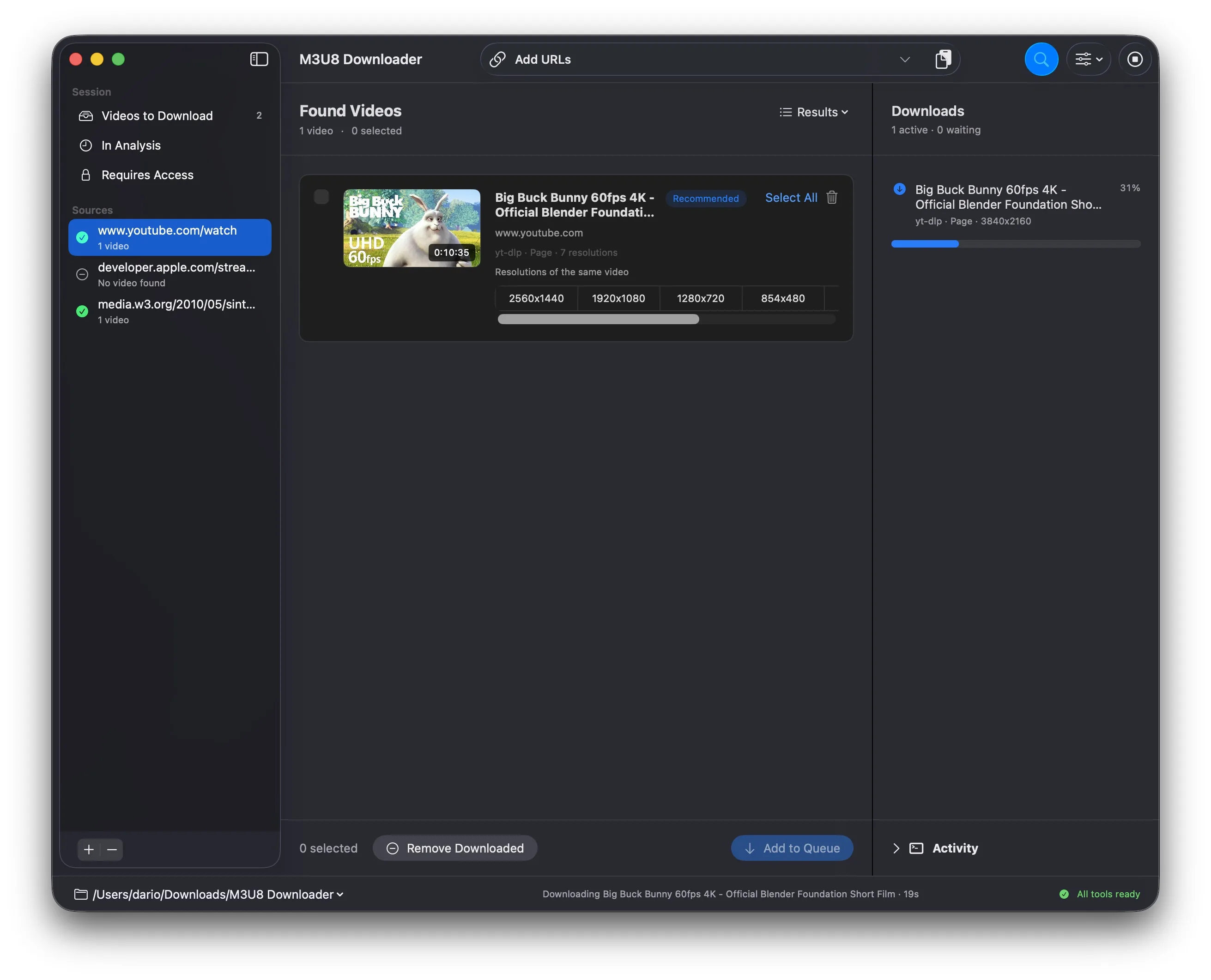
M3U8 Downloader showing Big Buck Bunny, the available resolutions, and an active download
Local no video upload
Cookies optional access
MP4 ready files

Built for our sites. Useful beyond them.

We had dozens of small apps, scripts, and shortcuts for downloading videos from our own sites and web projects. We got tired of that and built one proper Mac app. Then we decided to make it public, because the same problem is useful for other people too.

01

Analyze multiple sources

Video pages, HLS/M3U8 playlists, DASH streams, and direct files enter the same queue.

02

Choose the quality

Resolutions of the same video are grouped, and the app identifies the recommended option.

03

Access when needed

Use browser cookies or authorize a session in the app for media you already have permission to access.

How it works

  1. 01

    Paste the URLs

    Add one or more HTTP or HTTPS addresses to the analysis queue.

  2. 02

    Review videos and quality

    Check the source, preview, and resolutions, then select which videos to queue.

  3. 03

    Download to your Mac

    Follow progress and status; when finished, reveal the file directly in Finder.

Analysis and downloads in one workflow.

Paste URLs, choose qualities, and download. Under the hood, the app combines HTML analysis with rendering for dynamic pages, validates direct sources, groups variants of the same video, and selects the appropriate download method.

  • Requirements: Mac with macOS 14 or later.
  • Analyzes video pages, HLS/M3U8 and DASH streams, and direct video files.
  • Can inspect JavaScript-loaded pages and, when enabled, subpages on the same domain.
  • Runs 1 to 8 concurrent downloads, with automatic retries and an activity log.
  • Browser cookies and saved sessions are optional and remain on your Mac.
  • Checks signed stable updates and asks before installation.
  • Designed for videos you are allowed to download.

Always know what is downloading.

Queue, percentage, destination, errors, and outcome stay visible. You can reveal each completed file in Finder, while the activity log retains technical details.

Use cases

  • Download videos from sites and web projects you manage.
  • Download from links and video pages you are authorized to use.
  • Prepare authorized local copies of lessons, webinars, events, and replays.
  • Turn batches of URLs into local MP4 files.

The file stays on your Mac.

  • No video upload.
  • No account required by the app.
  • Choose the folder; names and subfolders are derived from the source.
  • Cookies and sessions are optional and remain on your Mac.

Have video links to save on your Mac?

Paste multiple URLs, review sources and qualities, then download only the selected videos. Separate analysis and download queues keep the workflow clear and organize local files by source page.

Open source

Bundled FFmpeg with corresponding source.

M3U8 Downloader 2.1.1 includes FFmpeg 9.0.1 built from the official source under LGPL 2.1 or later, with GPL and non-free components disabled.

Changelog

M3U8 Downloader changelog

Version 2.1.1 — view all changes

Version 2.1.1

Version 2.1.1 brings the browser extension workflow to Safari while keeping analysis local and explicitly initiated.

  • Analyze the current Safari page from the toolbar with the new Safari extension included in the Mac app.
  • Open Safari’s extension settings directly from M3U8 Downloader and receive clear feedback if macOS cannot open them.
  • Use the same privacy-focused browser workflow across Safari, Chrome, and Edge: only the active page URL is handled, locally and after an explicit click.

Let’s talk

Request information

M3U8 Downloader Configure your request. We will reply with availability and a confirmed price.

Only name and email are required.

By sending the request, you confirm that you have read the privacy policy.